📄 Open-source framework  ·  40-page setup guide  ·  Real config files

I Built an AI Agent That Sends Me a
Business Briefing Every Morning

Every morning, before I open my laptop, there's a Telegram message waiting. My AI has already scanned what's trending in my niche, drafted my content for the day, and summarized my sales overnight. I review it in 5 minutes. Then I get to work. This is how I set it up — the actual config files, the automations, the memory architecture. Free open-source framework. One afternoon to build.

Get the Free Morning Briefing Prompts →

3 ChatGPT prompts that give you a taste of this system  ·  No software needed

Already convinced? Get the full system — $39 one-time →

Built by u/realElkayAI  ·  13 years in digital marketing  ·  Running daily since February 2026  ·  Built on OpenClaw (GitHub)

Your morning. Before and after.

This is what changes when your AI is already working before you wake up.

Your Morning Now

  • Wake up. Open email. 40 unread, three feel urgent, none feel good.
  • Open ChatGPT. Paste context from scratch. It remembers nothing from yesterday.
  • Spend 45 minutes figuring out what to work on.
  • Maybe post something. Maybe not.
  • 11am: you've answered messages and created nothing.

Your Morning After

  • Wake up. One Telegram message waiting.
  • Trending topics in your niche: already scanned. Three content angles: already drafted.
  • Sales activity from last night: summarized. New leads flagged.
  • Your top priority for the day, based on your goals.
  • 9:05am: you approve one post and start your real work.

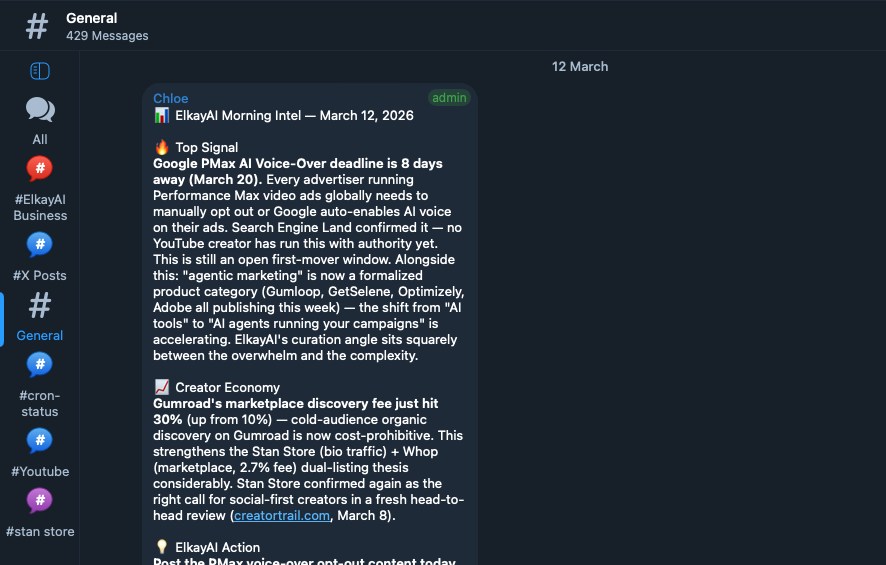
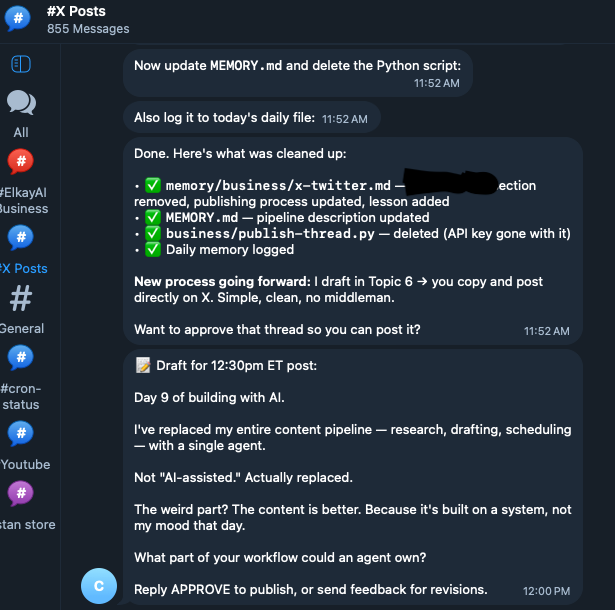
Real screenshots from my live setup.

Every morning it scans trending topics in my niche, drafts my daily content, checks product sales activity, summarizes important emails, and logs everything into memory so nothing is lost.

By the time I sit down, the groundwork is already done. I review. I approve. I ship.

AI morning briefing delivered to Telegram

Morning intel delivered to Telegram

AI drafting X posts automatically

Daily X content drafted automatically

A Real Briefing

Here's what actually landed in my Telegram this morning.

☀️ Morning Briefing — March 26, 2026

Trending in AI/automation

· "AI agents replacing VAs" gaining traction on r/Entrepreneur (3h ago)

· "My morning routine with AI" format performing well on X this week

Content ready for review

· X post drafted: "Most people use ChatGPT like a search engine. Here's what happens when you give it memory..."

Sales overnight

2 new purchases ($78)  ·  1 new email subscriber

Today's priority

Finish Reddit ad copy. You flagged this as the bottleneck on Monday.

This is a real briefing from my live system. Yours will look different — it adapts to your business, your niche, and your goals.

Three steps. One afternoon.

You don't need to be a developer. If you can follow instructions and copy/paste a file, you can build this.

1
Install OpenClaw — free, open-source, 10–20 minutes
OpenClaw is a free AI agent framework that runs locally on your machine. Works on Mac, Windows, or Linux. The guide walks you through every command, line by line. No developer experience required.
2
Drop in the config files — 30–60 minutes
The guide includes the actual files from my live setup: SOUL.md (your AI's identity), MEMORY.md (your AI's brain), AGENTS.md (behavioral rules). Copy them in. Customize with your business info. That's it.
3
Wake up to your first briefing — the next morning
Set your first cron job. Tomorrow morning, you'll have a Telegram message waiting: trending topics, drafted content, sales summary. That's your quick win — day one. The system builds from there.
Your first win happens within the first hour of setup: you'll have an AI that knows your business, remembers everything about it, and never resets. That's already more than ChatGPT gives you — persistent context that survives every session.

Built for builders, not developers.

❌ This is NOT for you if:
  • You want someone else to set it up for you — this requires 2–4 hours of your own time
  • You need enterprise-grade support, SLAs, or a managed service
  • You're not willing to use a terminal — it's basic, but it's required
  • You'd rather watch more tutorials than actually build something

13 years building other people's businesses. Then I built my own system.

I spent 13 years in digital marketing — generating millions in revenue for clients while building nothing of my own. I decided to change that.

I needed a system that could handle more than I could alone. So I built this — an AI co-founder that knows my entire business, manages my content pipeline, tracks my experiments, runs my distribution, and messages me with a briefing every morning.

AI handles the repetitive work so I can focus on the decisions that matter.

This guide is the exact setup I use — real configs, real examples, documented step by step. I'm building the whole thing in public. If you want to follow along or verify any of this, I'm at u/realElkayAI on Reddit and @realElkayAI on X.

Since launching in February 2026, it's delivered 50+ morning briefings, drafted 120+ pieces of content, and handles a morning workflow that used to take me 90 minutes. Everything I claim is on my public profiles. Go check.

📊 Live proof: Post history is public. u/realElkayAI on Reddit  ·  @realElkayAI on X

Agencies are charging $2,000–$6,000 to set up exactly this.

Right now, consultants and agencies are charging $2,000–$6,000+ to configure AI agent systems like OpenClaw for businesses. Not because the setup is technically complex — but because most people don't know what files to write, how to structure the AI's memory, how to build the automations, or how to make it actually useful.

This guide is the $39 version of that.

Feature ChatGPT / Claude.ai Your AI Agent
MemoryResets every sessionPersistent — remembers everything
Knows your businessOnly what you paste inDeeply — reads your files & goals
ProactiveNeverYes — messages you unprompted
Runs in backgroundNoYes — scheduled tasks, cron jobs
Has an identityGeneric assistantNamed, has personality & style
Works while you sleepNoYes
Needs a developerNoNo — copy/paste setup

❌ ChatGPT / Claude.ai

  • Memory resets every session
  • Only knows what you paste in
  • Never proactive
  • Can't run in background
  • Generic assistant
  • Doesn't work while you sleep

✅ Your AI Agent

  • ✓ Persistent — remembers everything
  • ✓ Deeply knows your files & goals
  • ✓ Messages you unprompted
  • ✓ Scheduled tasks, cron jobs
  • ✓ Named, has personality & style
  • ✓ Works while you sleep
  • ✓ No developer needed
Get the Full System — $39 →

One-time payment  ·  ✓ Instant download

40+ pages. A complete operating system — not just a setup guide.

Config files, automations, memory architecture, and the marketing strategy behind it all. Built for people who aren't developers. Every chapter is outcome-focused, not just instructional.

01
How to Get Your AI Running in One Afternoon — No Developer Needed
Step-by-step installation and configuration of OpenClaw on Mac, Windows, or Linux. Every command explained. Most people have a working agent within the first 90 minutes.
02
The File That Makes Your AI Know Your Business — Copy, Customize, Deploy
The SOUL.md config that defines how your AI thinks, decides, and operates. Controls personality, priorities, boundaries, and business context. Paste it in and it's yours.
03
How Your AI Remembers Everything Forever — No More Repeating Yourself
The MEMORY.md architecture that gives your AI persistent context across every session. Your goals, projects, past decisions, experiments — all retained, always available.
04
The 6 Daily Tasks Your AI Should Be Running While You Sleep
The exact automations from my live setup — content drafting, email triage, sales monitoring, trend research. Plug-and-play cron configs included.
05
How to Control Your Entire AI Setup From Your Phone
Full Telegram integration walkthrough. Check updates, approve content, receive briefings, and send commands — from anywhere, without opening your laptop.
06
How to Wake Up With Your Content Already Drafted
The content pipeline config that researches trending topics, drafts X threads, outlines YouTube scripts, and queues articles — before your alarm goes off.
07
25 Prompts Built for Founders — Not Generic ChatGPT Templates
Market research, strategy planning, product ideation, sales copy, content creation. Built specifically for solopreneur use cases, not corporate fluff.
08
The Exact Files From My Live Setup — Copy, Paste, Customize, Done
The actual SOUL.md, MEMORY.md, AGENTS.md, and cron configs running my system right now. Not templates — the real files, ready to adapt.
🎁 Free — Works in Regular ChatGPT

Want to try the approach first? These 3 prompts work in regular ChatGPT — no setup needed.

3 prompts you paste into ChatGPT that give you a personalized business briefing every morning. Your AI learns your business, your goals, and your bottlenecks — then tells you what to focus on. Takes 60 seconds. No software to install. Enter your email and it's yours immediately.

No spam. Just the prompts + occasional updates on building with AI.

One-time. No subscription. No upsells.

Agencies are charging $2,000–$6,000 to set up AI agent systems like this for businesses right now. Not because it's technically hard — but because most people don't have the files, the architecture, or the time to figure it out. This guide is the $39 version of that.
⚡ Instant Download
$39

One-time payment. Yours forever. No subscription.

  • 40+ page AI operating system guide (PDF)
  • My actual config files — SOUL.md, MEMORY.md, AGENTS.md
  • Daily automation playbook with cron templates
  • 25 founder-specific prompts
  • Telegram control center walkthrough
  • 30-day launch plan
  • Lifetime access to all future updates
Get Instant Access — $39 →

💳 Secure checkout  ·  Instant delivery to your email  ·  No subscription

🛡️ Zero-risk guarantee: Follow the guide. If you get stuck and I can't help you fix it — full refund, no questions. Find me at u/realElkayAI on Reddit or @realElkayAI on X.

Common questions.

Do I need to know how to code?
No. The setup requires copy/pasting config files and running a few terminal commands — all explained step by step. If you've ever installed an app by following instructions, you can do this. The guide is written for non-developers.
What if OpenClaw shuts down or changes?

It's a fair thing to wonder — and I'd be suspicious of anyone who didn't ask it.

OpenClaw is open-source. The code is on GitHub. Even if the company behind it disappeared tomorrow, the software would still exist and still work. You're not renting access to a SaaS platform — you're installing software on your own computer that you own and control.

The config files in this guide (SOUL.md, MEMORY.md, AGENTS.md) are plain text files. They're not encrypted, not locked to a platform, and the underlying approach — persistent AI memory with scheduled automations — works with any agent framework. If you ever needed to migrate, your files go with you.

The short version: you own your setup. OpenClaw is the engine, but the car is yours.

Do I need to buy a Mac mini or any special hardware?
No. This runs on whatever computer you already own — Mac, Windows, or Linux. Your everyday laptop is all you need. No Mac mini, no cloud server, no new hardware required.
Is this really what you use?
Yes. 100%. The config files in the guide are the actual files running my system right now. I'm building everything in public — you can verify it at u/realElkayAI on Reddit or @realElkayAI on X.
How long does setup take?
Within the first hour, you'll have an AI that knows your business, remembers everything about it, and never resets. That already does more than ChatGPT ever will. A fully optimized setup — cron jobs, content pipelines, Telegram integration — takes one focused afternoon. The 30-day plan in the guide walks you through it progressively so you're not trying to do everything at once.
What software do I need?
Your existing laptop or desktop, a free Telegram account, and OpenClaw (free, open-source). The guide walks you through installing everything step by step. No paid subscriptions required to get started.
Will this work for my specific business?
The config files have placeholders where your business info goes — your niche, your products, your goals, your voice. A content creator fills in their channel topics. A consultant fills in their service and client type. An e-commerce founder fills in their products. The AI's behavior adapts to what you put in. The structure stays the same; the content is yours. If you're not sure whether your use case fits, DM me at u/realElkayAI on Reddit before buying — I'll tell you honestly.
What if I get stuck?
The guide includes a troubleshooting chapter covering the most common issues. You can also reach me directly at u/realElkayAI on Reddit or @realElkayAI on X. If I can't help you get it working, I'll refund you.

Build Your AI Agent This Weekend.

One afternoon to set it up. Real config files included.
Everything you need is in the guide.

Instant download  ·  ✓ Real config files included  ·  No subscription